Goal Setting
Set clear goals to drive progress and stay focused.
The "Goal Setting" slide template helps you visually track objectives, making it easy to communicate your goals and their progress to your team. By setting clear targets, you ensure everyone is aligned and working toward the same outcomes. This template encourages accountability, helps monitor milestones, and keeps your goals top of mind.
Video: Template Tour
Content Source
Once you have created your slide using the Goal (Setting) template, choose a content source to start adding your content:
Web Portal
- Choose Web Portal in the Content Source dropdown
- Set your Goals
- Click [Add Content] to add Goals via the content editor and click [Save]
- Repeat step a to add more content
- When you are ready to go live, add your Goal Setting slide to one or more playlists.
File Upload (XLSX)
- Choose File Upload (XLSX) in the Content Source dropdown
- Download the Goal Setting data template
- Use the data template (XLSX file) to add your Goals.

- Save your XLSX file locally and upload the saved file into the slide editor
- When you are ready to go live, add your Goal Setting slide to one or more playlists.
Google Sheets

Follow the prerequisite steps to set up your integration and get started with Google Sheets seamlessly.
- Vibe Portal - Set the content source to File Upload (XLSX) and download the VIBE-DATA-TEMPLATE_GoalSetting.xlsx.
- Google Drive - Upload the VIBE-DATA-TEMPLATE_GoalSetting.xlsx to your connected Google Drive folder and add your data
- Vibe Portal - Choose Google Sheets in the Content Source dropdown and select your saved Google Spreadsheet

Recommended Reading: Prep your Google Sheets
SharePoint (XLSX)
Follow the prerequisite steps to set up your integration and get started with using SharePoint Folders to store your Excel files.
- Vibe Portal - Set the content source to File Upload (XLSX) and download the VIBE-DATA-TEMPLATE_GoalSetting.xlsx.
- SharePoint - Upload the VIBE-DATA-TEMPLATE_GoalSetting.xlsx to your connected SharePoint folder and add your data
- Vibe Portal - In the slide editor, choose SharePoint (XLSX) in the Content Source dropdown and select your saved Excel file.
XLSX Data Template
If you have selected 'File Upload (XLSX)', 'Google Sheets' or 'SharePoint (XLSX)' as your content source, use this section as a guide for formatting the data in your spreadsheet.
Supported Data Formats
| Data Column | Supported Formatting |
| Title | Free format. Bold and underline formatting is supported. |
| Summary | Free format is supported, including bold, underline, bullet points, and numbering. |
| Percentage | Numeric |
| Date | DD/MM/YYYY or MM/DD/YYYY |
| Time | HH:MM (24hr) or HH:MM AM and HH:MM PM |

Recommended Reading:
Common Data Entry Formats (for more information on managing your data)
Design
- Shape 1 - Transform your vision! 🎨✨ Use the color picker to give your goals a vibrant background. What shade inspires you today?
- Shape 2 - Use the color picker and adjust shape to make your percentage tracker uniquely yours. What shape reflects your progress?
Content Tips
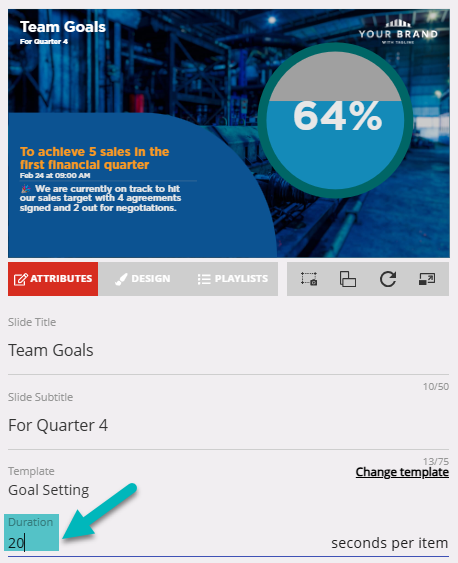
Duration
Allows you to set the duration a slide remains on the screen
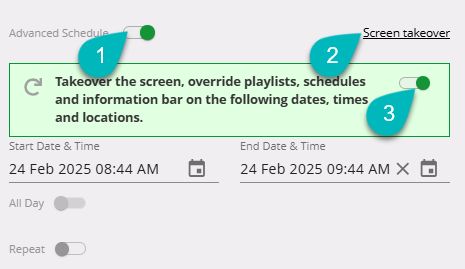
Advanced Schedule or Screen Takeover
Need to pre-schedule or queue your item for repeated display? Use the Advanced Schedule or Screen Takeover to pre-set the publish dates for your slide.
Use-Case Scenario
New Market Client Acquisition Goal
A non-bank lender specializing in residential mortgages, auto loans, and personal loans has recently expanded into a new country. The leadership team uses the Goal Setting slide to publicly track the quarterly client acquisition target and celebrate milestones toward reaching that goal. The slide is displayed across lobby screens, break rooms, and regional offices to maintain focus and accountability, while keeping teams aligned on the expansion plan.
A non-bank lender specializing in residential mortgages, auto loans, and personal loans has recently expanded into a new country. The leadership team uses the Goal Setting slide to publicly track the quarterly client acquisition target and celebrate milestones toward reaching that goal. The slide is displayed across lobby screens, break rooms, and regional offices to maintain focus and accountability, while keeping teams aligned on the expansion plan.
Using Vibe.fyi, the Goal Setting slides are published to corporate dashboards and regional screens. Each quarter includes a visual progress indicator (e.g., a percent complete) and a breakdown of key milestones. The tone is data-driven, aspirational, and aligned with the brand voice. Benefits include sustained momentum for the market launch, clear visibility of progress, and a cohesive cross-country rollout.